
Skip to content
Grovia Tender

AI Bid Operating System · Built for India

Find the right tender. Know if you qualify. Get a bid ready to submit.

Grovia Tender learns your company once, then tells you which tenders fit, whether you are eligible, whether you should bid, and prepares the complete bid from your own documents. You review and submit.

Free plan, no credit card. Made for businesses that have never bid before.

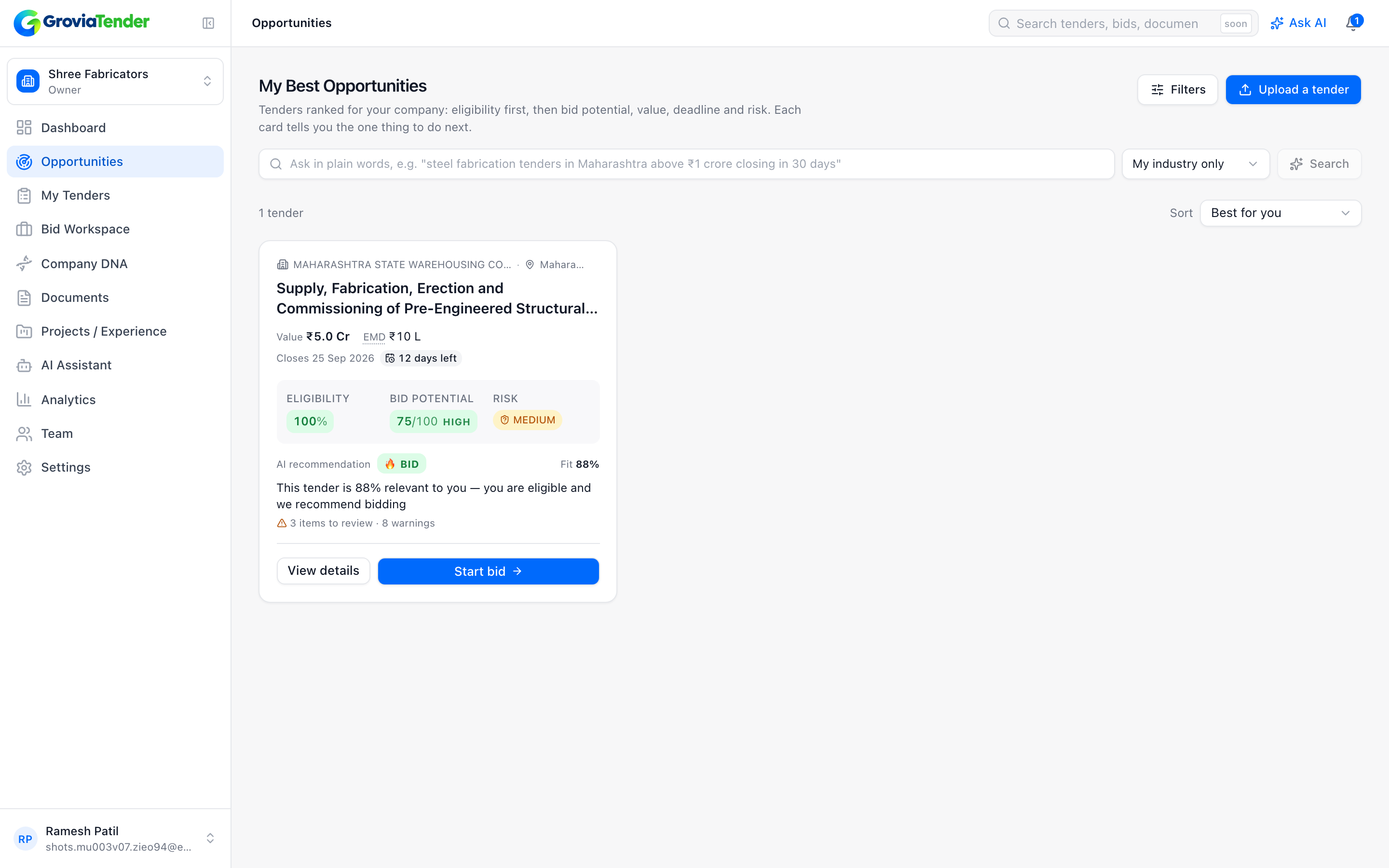
Tender card from Grovia TenderGovernment warehouse fabrication tender worth ₹5 Cr: Eligibility 94%, Bid Potential 86 out of 100, Risk Medium, recommendation BID.GOVERNMENT · WORKSCloses in 21 daysFabrication and erection of steel warehouseBuyer: Central Warehousing Corporation · Pune, MaharashtraEstimated value ₹5.00 Cr · EMD ₹10 LEligibility94%Bid Potential86/100RiskMedium10% PBG · LD 0.5%/wk🔥 BIDTurnover, experience, ISO 9001 met · 15 of 18 documents readyStart bid
  1. Find the right tender
  2. Know if you are eligible
  3. Decide whether to bid
  4. Prepare the bid from your documents
  5. Get a submission-ready package
  6. Learn from every result

Not a tender listing site

Five questions every bidder asks. Grovia Tender answers all of them.

Listing portals hand you thousands of notices. Grovia Tender starts from your company and works the problem the way a good bid manager would.

  1. Question 1

    What tenders are relevant to my company?

    Tender intelligence and matching, scored 0–100 against your Company DNA.

  2. Question 2

    Am I actually eligible?

    Every criterion checked against your documents, with the evidence shown.

  3. Question 3

    Should I spend time and money bidding?

    Bid Potential score, risk analysis and a Go/No-Go recommendation with reasons.

  4. Question 4

    Can the system prepare most of the bid for me?

    AI-drafted proposal, document checklist, BOQ pricing and the final bid package.

  5. Question 5

    Can it learn from the result?

    Bid memory and win/loss learning make the next bid better than the last.

How it works

From tender to submission-ready package in six steps

Follow a steel fabricator in Pune (₹20 Cr turnover, ISO 9001, 100 employees) as it works a ₹5 Cr government warehouse tender.

  1. Step 1: Set up your Company DNA once

    Answer plain questions about what you do, where you work and what you have delivered. Upload your certificates and work orders; the AI reads them and fills in the rest.

    In the demoA steel fabricator in Pune enters ₹20 Cr turnover, ISO 9001 and 100 employees, and drops in its GST, MSME and completion certificates.
  2. Step 2: Bring in a tender

    Upload a tender package as PDF, ZIP or a URL, or let matching feeds bring relevant tenders to you. Every tender gets the same full analysis.

    In the demoThe team uploads a ₹5 Cr government warehouse fabrication tender.
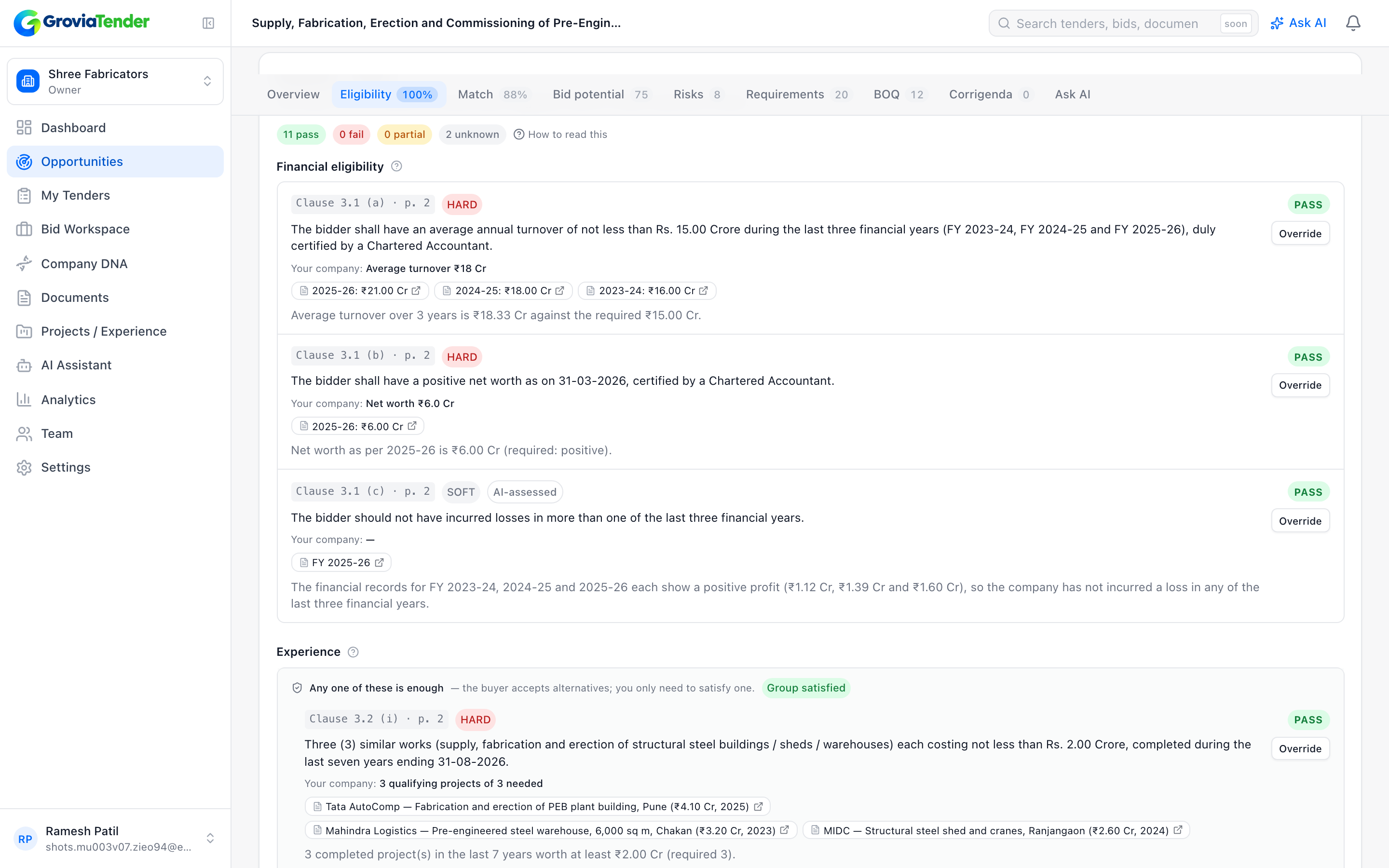
  3. Step 3: See eligibility with evidence

    Each criterion is checked against your documents. You see PASS, FAIL or NEEDS REVIEW, and the exact document that proves it.

    In the demoWithin a minute: Eligibility 94%. Turnover, experience and ISO criteria pass, each pointing to the certificate that proves it.
  4. Step 4: Decide with a Go/No-Go

    Bid Potential score, risk register (EMD, LD, PBG, payment cycle) and a clear recommendation with reasons in plain English.

    In the demoBid Potential 86/100. Recommendation: BID. Risk: Medium, because of a 10% performance bank guarantee.
  5. Step 5: Let the system draft the bid

    The proposal is written from your own facts, every claim traceable to a document. The required-document checklist is filled from your vault. You approve the BOQ pricing.

    In the demo15 of 18 required documents found automatically. The proposal is drafted; three items need the team’s input.
  6. Step 6: Review, approve, submit, learn

    A final bid package and portal checklist for your review. You submit on the portal yourself. Record the result and the system learns for next time.

    In the demoThe team reviews the checklist and package, submits on the portal, and records the outcome.
Required-document checklist from Grovia Tender15 of 18 required documents found in the vault; one expiring soon and three to upload.Required documentsWe found 15 of 18 documents in your vault.15 / 18GST registration certificateFoundUdyam (MSME) certificateFoundISO 9001:2015 certificateFoundAudited financials FY 2023–24FoundTurnover certificate (CA)Expires soonCompletion certificate — Adani warehouseUploadEMD receiptUploadUpload the Adani completion certificate and we will attach it automatically.

Within a minute of upload, the demo tender shows:

Eligibility
94%
Bid Potential
86 / 100
Recommendation
BID
Risk
Medium
Documents
15 of 18 found
Read the full walkthrough →

Capabilities

Everything between “there is a tender” and “the package is ready”

One system, from Company DNA to bid memory. Deterministic rules decide the arithmetic; AI reads, extracts and writes.

Company DNA

Set up once. Identity, financials, experience, certifications, people, infrastructure and geography become the profile every tender is matched against.

Document Vault with AI reading

Upload certificates, work orders and financials. The AI classifies them, extracts the facts and tracks validity and expiry.

Tender upload or feeds

PDF, ZIP or URL upload, or matching feeds. Uploaded tenders receive the identical full pipeline.

Eligibility with evidence

Every criterion is checked and explained, with the document that proves it. Nothing is marked PASS without evidence.

Bid Potential score

A 0–100 score with its reasoning, so you know where you stand before you spend a rupee.

Go/No-Go recommendation

BID, NO BID or REVIEW, with the reasons in plain language.

Risk analysis

EMD, liquidated damages, performance bank guarantee, payment cycle, timelines and penalties, flagged with severity.

Corrigendum alerts

“Turnover requirement changed from ₹5 Cr to ₹10 Cr — your eligibility changed.” Amendments are diffed and your scores are refreshed.

AI-drafted proposals

Executive summary, technical approach, methodology, experience, declarations. Every claim is traceable to your documents.

Built for first-time bidders

For people who have never bid before

The standing rule behind every screen: a person with no tendering experience should be able to manage a bid end to end.

One clear next action

“Start this bid.” “Upload 3 missing documents.” “Approve pricing.” Every screen tells you the one thing to do next and why.

Every number explained

“You are eligible because your average turnover is ₹18.3 Cr and this tender asks for ₹15 Cr.” Nothing is a bare score.

Jargon with tooltips

EMD, BOQ, PBG, LD, corrigendum, compliance matrix, pre-bid, Udyam: hover or tap and you get a plain definition.

Drafts complete by default

The proposal is written in full from your facts. You only see the gaps, asked as questions, and approve.

Hand-held submission

The final step lists exactly what to do on the portal, in order, with files named as the portal expects.

Guided, not configured

Onboarding asks “What does your company make or do?” and “Which states can you work in?”, then derives the technical fields.

Human in the loop

The system prepares. You decide.

Safety is silent but visible. Every approval button says what will happen and what will not.

Never submits

There is no code path that submits a bid to any portal. You download the package and submit it yourself, with a step-by-step checklist.

Never signs

No digital signatures, no DSC handling. Declarations are drafted for you to read and sign.

Never prices on its own

BOQ line items are extracted and totals computed, but every rate is entered or approved by you before anything is built.

Never claims without evidence

A criterion is marked PASS only when a document proves it. AI outputs that cannot be verified are flagged for your review, never stored as fact.

Corrigendum example: “Turnover requirement changed from ₹5 Cr to ₹10 Cr — your eligibility changed.” Amendments are diffed, your scores refreshed, and you are told what it means for you.

Industries

Vertical-agnostic by design

Industries, categories, scoring weights and document taxonomies are data, not code. Thirteen verticals are configured out of the box.

  • Manufacturing
  • Engineering
  • Construction
  • IT & Software
  • Electrical
  • Mechanical
  • Infrastructure
  • Healthcare
  • Security Services
  • Facility Management
  • Consultancy
  • Professional Services
  • Supply & Trading

Used by msmes and smes, contractors, manufacturers, engineering firms, it and system integrators, consultants, service providers, government suppliers and tender consultants and bid agencies. See how each vertical is handled →

What bidders say

Illustrative examples

Real customer stories will appear here once early customers have given permission to quote them.

Illustrative example

We used to skip government tenders because reading a 200-page document took two days. Now we know in minutes whether it is worth our time.

Owner · Steel fabrication, Maharashtra
Illustrative example

The eligibility check pointed to the exact certificate for every criterion. Our bid manager stopped guessing.

Bid manager · IT system integrator
Illustrative example

Fifteen of eighteen documents were already attached before we opened the tender. We only had to upload three.

Director · Electrical contractor

Pricing

Simple plans in rupees

Start free. Pay monthly, or pay per bid from ₹1,999 when you only need one prepared. Prices exclude GST.

Free

See what the system knows about your company.

₹0forever

Most popular

Pro

For a company bidding a few tenders a month.

₹3,999per month + GST

Business

For bid teams and tender consultants.

₹14,999per month + GST

Enterprise

For large bidders and groups.

Customannual agreement

FAQ

Common questions

Upload your next tender and see what the system already knows.

Free to start. No credit card. Your documents stay private to your company.